
T-4 Permit Search | Texas RRC Pipeline Permits & GIS Routes
Search Texas RRC T-4 permits by operator, county, and route. Review GIS evidence, source dates, and related PS-48 construction records.
By Johnathan · Reviewed by EnergyNetWatch Research · Evergreen guide · Content updated 2026-09-01
T-4 permit search
Start with a permit number when you have one. Otherwise narrow by operator and county, then check the available GIS route evidence before treating the record as an infrastructure signal.
Use the exact T-4 identifier when it is available.
Review the source-filed operator or system label.
Narrow the permit list and route evidence to the review area.
Confirm mapped segments, route context, and source limits.
Key Takeaways
- Texas RRC T-4 permits are pipeline infrastructure records, not drilling permits.
- PS-48 adds new-construction-report fields and stated construction timing; it does not replace T-4 permit, system, or route context.
- Join the records by T-4 identifier where available, then compare operator/project, county, source clock, timing field, and GIS evidence.
Texas RRC T-4 pipeline permits should be treated as infrastructure records, not just permit numbers.
How To Monitor Texas T-4 And PS-48 Records Together
T-4 and PS-48 are separate Texas RRC pipeline records.
T-4 provides pipeline permit, operator, system, commodity, classification, and route context where those fields are available. PS-48 is a New Construction Commencement Report and can provide operator, project, county, product, mileage, and stated construction-start context.
Monitor them together by matching the T-4 identifier when a PS-48 row includes one, then comparing operator, system or project name, county, source date, stated construction timing, and GIS route evidence. Neither record alone proves that construction started, finished, entered service, or resulted in a commercial award.
| Record | What the source can provide | Timing field | Operator and county review | What it does not prove |
|---|---|---|---|---|
| T-4 | Pipeline permit, operator/system, commodity, classification, and route context where available | Use the date supplied by the specific T-4 source surface; the current annual PDF does not include per-row issue dates | Filter the source row and mapped segments by operator/system and county | Construction start, completion, in-service status, capacity, spend, or award |
| PS-48 | New construction report, operator/project, product, county, mileage, T-4 identifier where reported, and stated construction start | Stated construction start and filing/source clock where published | Filter by operator/project, county, start window, product, mileage, and T-4 availability | Actual field progress, completion, in-service status, spend, or award |
Official source pages:
A T-4 record can identify the pipeline operator, commodity, classification, location, and source date. But the stronger workflow starts when that source row is connected to map context and GIS route evidence.
That is where a pipeline permit becomes more than a row in a list. It becomes a source-backed infrastructure signal that a midstream, service, operating, analyst, or data team can review and qualify.
This EnergyNetWatch example uses a Firebird Energy II LLC Texas T-4 gas/private pipeline permit. The public-record workflow connects the permit to map context, operator context, county coverage, source date, GIS route matching, diameter range, commodity, and a review-ready record summary.
For the recurring current-source view, see the Texas T-4 Pipeline Permit Watchlist. The watchlist keeps the source-clock baseline, operator/county split, commodity mix, and archive of dated T-4 reviews separate from this evergreen workflow explainer. For construction-notice context, see the Texas PS-48 pipeline construction signals.
Latest Texas T-4 Watchlist
The current Texas T-4 Pipeline Permit Watchlist preserves the August 21 statewide 2026 PDF baseline and keeps it separate from the July 27 review of Austin, Chambers, Lee, Reeves, and Upton county pipeline GIS files. The five-county review contains eight exact T-4 identifiers above the older 10767 reference sequence. All eight are now present in the current statewide list, which contains 60 unique identifiers through 10798.
Use this page for the T-4, PS-48, and route-evidence monitoring method. Use the watchlist for the current T-4 source review and the Texas PS-48 pipeline construction signals page for the current construction-notice review.
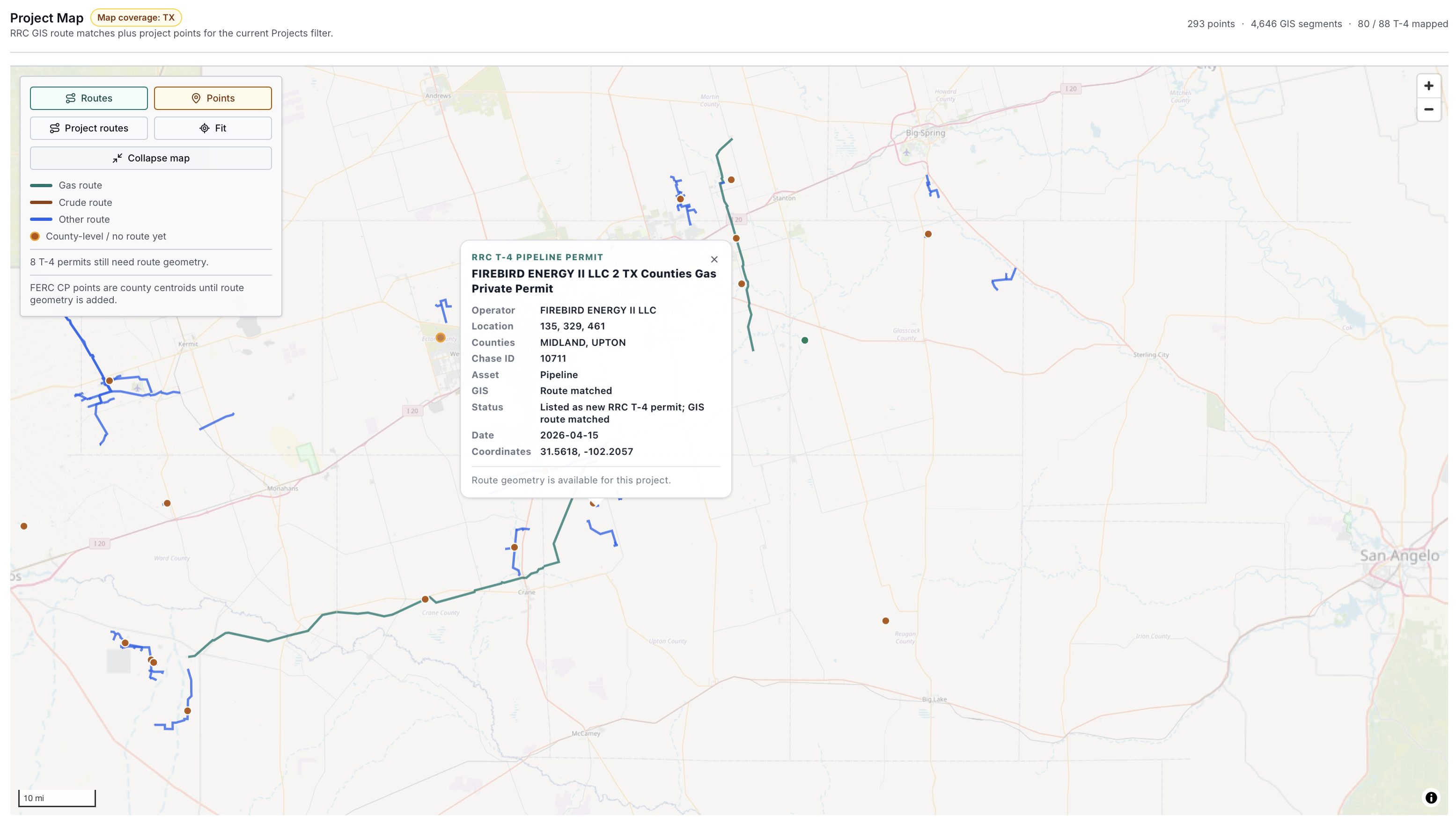
EnergyNetWatch midstream map view showing route and point context for a selected Texas RRC T-4 pipeline permit. The selected popup connects the map to operator, county, source date, GIS match, and permit status context.
Why Texas RRC T-4 Pipeline Permit GIS Matters
Pipeline GIS data and pipeline permit data answer different questions.
GIS context helps answer where infrastructure sits. Permit context helps answer who filed or operates the record, what the source record says, when the record appeared in the source workflow, and what type of pipeline activity is being reviewed.
The value comes from connecting both layers:
| Layer | What it adds |
|---|---|
| T-4 permit row | Operator, permit context, commodity, classification, source date, and location fields |
| Map view | Spatial context, route shape, nearby activity, counties, and review area |
| GIS route evidence | Matched segments, diameter range, system/operator context, and route confidence |
| Record workflow | A compact summary a team can review, qualify, export, or monitor |
For searchers looking for Texas RRC T-4 pipeline permit GIS, that connection is the core value. A flat permit row is a starting point. A mapped and evidence-backed permit row is a working lead.
Example: Firebird Energy II T-4 Permit With GIS Route Evidence
The Firebird example starts with a Texas RRC T-4 pipeline permit source record and then adds route evidence from the current EnergyNetWatch midstream workflow.
| Field | EnergyNetWatch workflow field |
|---|---|
| Operator / applicant | Firebird Energy II LLC |
| Asset type | Pipeline |
| Source date | 2026-04-15 |
| Date basis | Source record |
| Status confidence | Known |
| GIS match status | Route matched |
| Permit status | Listed as new RRC T-4 permit |
| Commodity | Natural gas |
| Diameter evidence | 4.5-10.75 inches |
| GIS route evidence | 13 route segments |
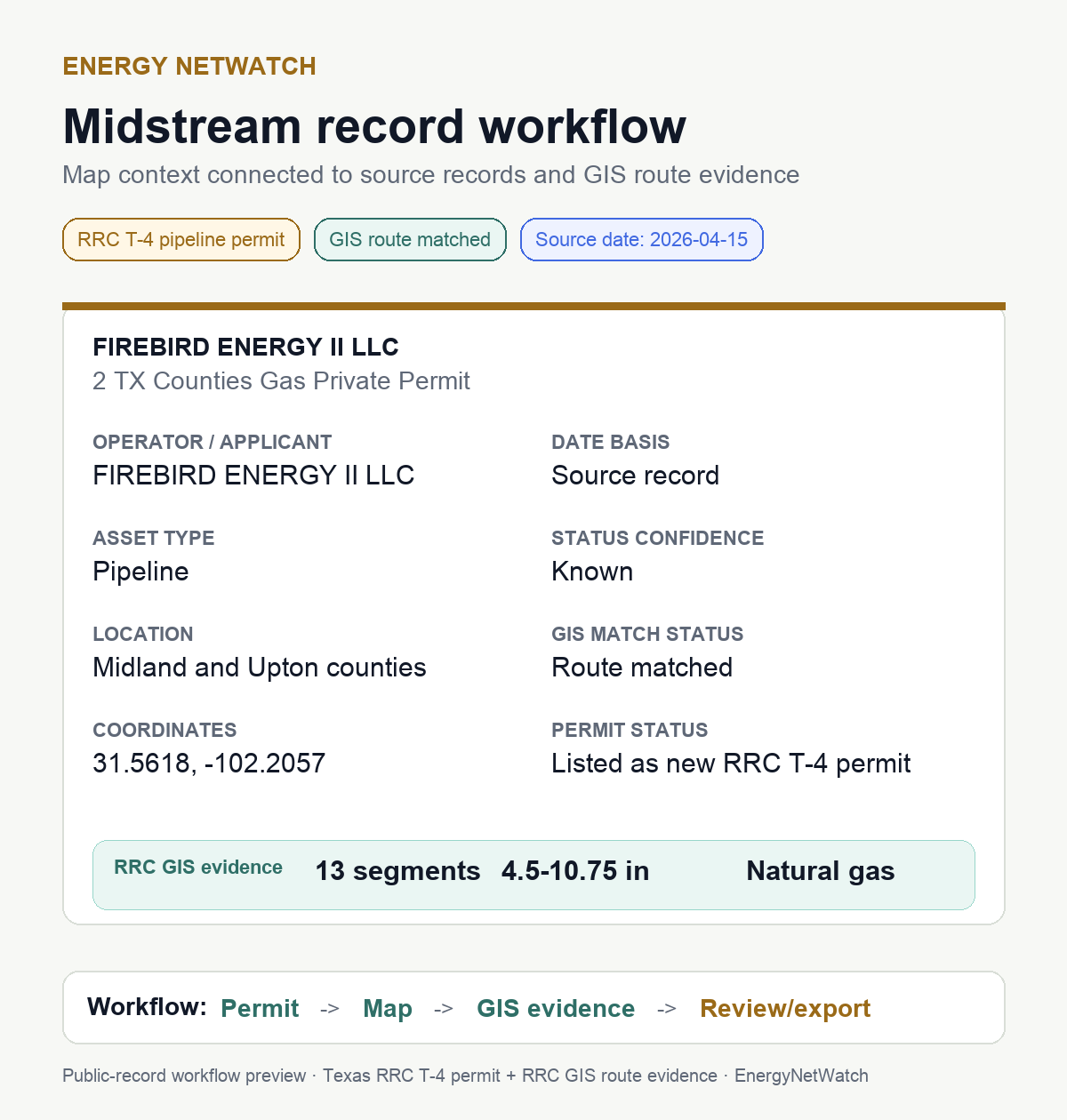
Public-record workflow preview built from the Firebird Energy II T-4 permit, route match, source date, and RRC GIS evidence. The image removes internal report clutter and keeps the review fields that matter for public explanation.
The important part is not just that the line appears on a map. The important part is that the map is tied back to a source record, and the source record is tied to review fields that can be used by a team.
That is the difference between visual context and an infrastructure workflow.
What The Map Shows
The map view gives the first layer of context:
| Map layer | Review use |
|---|---|
| Project route | Shows where route geometry is available for the selected project record |
| Project point | Shows source-record location context where project points are available |
| Route color | Separates gas, crude, and other route types in the current map view |
| Selected popup | Connects the map selection to source fields and record detail |
| Coverage counters | Shows the current mapped project universe and route-segment context |
In the Firebird example, the selected popup gives a compact summary: operator, location, counties, asset type, GIS route status, permit status, source date, and coordinates. That gives the route line business context.
But the map is still only the first step. A midstream workflow needs a record summary that can be reviewed outside the map.
What The Record Workflow Adds
The record workflow turns the selected map signal into a summary that can be reviewed by someone who is not sitting inside a GIS tool.
That matters for:
| User | Why the record workflow helps |
|---|---|
| Midstream business development | Turns route context into an operator/county infrastructure lead |
| Oilfield service and equipment teams | Surfaces pipeline, gas, diameter, and location context for account review |
| Analysts | Creates a source-backed record that can be compared with permits, wells, production, and company activity |
| Operators | Helps review infrastructure context around current operating areas |
| Data teams | Gives structured fields that can move into exports, alerts, or API workflows |
Evidence And Source Context
| Field | Current page context |
|---|---|
| Official source family | Railroad Commission of Texas pipeline permit and GIS records |
| Source type | T-4 pipeline permit row plus route/GIS review fields |
| Example operator | Firebird Energy II LLC |
| What this page can show | Operator, source date, county context, commodity, route match status, diameter evidence, and review fields |
| What this page cannot prove | In-service status, construction completion, capacity, economics, or commercial counterparty exposure |
Related pages:
- Texas T-4 Pipeline Permit Watchlist
- Texas T-4 Pipeline Permit Watchlist — June 2026
- Texas T-4 pipeline permits: how midstream infrastructure leads work
- Texas Pipeline Construction Signal Report package
- Texas T-4 Pipeline Permit glossary definition
The Firebird record workflow uses four steps:
| Step | Meaning |
|---|---|
| Permit | Start with the Texas RRC T-4 source record |
| Map | Review route and point context |
| GIS evidence | Check matched segments, diameter, commodity, and route attributes |
| Review/export | Qualify the record and move it into a follow-up workflow |
This is why a source-aware infrastructure page should not stop at a screenshot. The record needs enough context to support a decision about what to review next.
What This Record Does Not Prove
A matched T-4 permit is not the same thing as a full project profile.
The record should not be treated as proof of:
| Not proven by this view alone | Why |
|---|---|
| In-service date | A T-4 source row and matched route context do not necessarily prove operational status |
| Final construction status | Additional source documents may be needed |
| Project economics | Permit and GIS records do not establish commercial value |
| Counterparty exposure | The source row does not identify every commercial relationship |
| Complete lifecycle history | Amendments, transfers, or follow-up filings may require deeper source review |
Those limits are not a weakness of the workflow. They are why the source basis matters.
A good infrastructure workflow should make clear what the record supports and what still needs review.
How To Use Texas T-4 Pipeline Permit Data
The strongest way to use Texas T-4 pipeline permits is as a structured review queue.
A T-4 review workflow looks like this:
| Step | What to do |
|---|---|
| 1 | Filter current T-4 records by operator, county, commodity, and source date |
| 2 | Check whether the record has matched GIS route evidence |
| 3 | Review route segments, diameter range, system/operator context, and coordinates |
| 4 | Compare the route counties with wells, drilling permits, reported spuds, production, and facility records |
| 5 | Export, save, or monitor the record if it supports a follow-up workflow |
For teams tracking midstream infrastructure, this is more direct than treating permits and maps as separate research tasks.
The search problem is usually phrased as pipeline GIS data or Texas pipeline permit data. The operating problem is more specific: which records are source-backed, route-matched, and specific enough to review?
What To Request From EnergyNetWatch
If your team is evaluating Texas RRC T-4 records, the best request is a specific route-evidence package rather than a general product tour.
| Need | Better request |
|---|---|
| Review a T-4 record | Request the current Texas T-4 route evidence table |
| Compare operators | Request T-4 records grouped by operator, county, commodity, and source date |
| Check route support | Request matched GIS segments, diameter range, commodity, and route-confidence fields |
| Build an account list | Request T-4 records linked to nearby permits, wells, production, and facility records |
| Integrate the workflow | Request approved API access for selected infrastructure and source-freshness records |
Request the current Texas T-4 route evidence table if you need route-backed T-4 records, maps, exports, alerts, or API workflows.
If you only need to review the format before a full app conversation, request the current Texas pipeline construction sample report. Ask for the current T-4 route-evidence table, source date, matched GIS fields, and what still needs verification.
Frequently Asked Questions
What is a Texas RRC T-4 pipeline permit?
A Texas RRC T-4 permit is a pipeline permit record used in the Texas pipeline permitting and mapping process. It can identify operator, location, commodity, classification, and other pipeline attributes depending on the source record and related filings.
What does GIS route matched mean?
GIS route matched means the permit record has been connected to route context in the available pipeline GIS data. In EnergyNetWatch, that can add route segments, diameter range, commodity, counties, and system/operator context where supported by source records.
Is a matched T-4 permit the same as an operating pipeline?
No. A route-matched T-4 record should be treated as a source-backed infrastructure lead. In-service status, construction status, lifecycle history, and full project detail may require additional source review.
Why connect T-4 permits to maps?
The map shows where the infrastructure signal sits. The permit and record workflow explain what the signal is, who is associated with it, when the source record is dated, and what evidence is available for follow-up.
Who uses Texas T-4 pipeline permit GIS workflows?
Midstream teams, business-development users, oilfield service providers, analysts, operators, mineral buyers, and data teams can use T-4 permit GIS workflows to prioritize infrastructure review.
Related EnergyNetWatch Pages
- Texas RRC data guide: production, permits, and well records
- Texas T-4 pipeline permits: how midstream infrastructure leads work
- Texas infrastructure records: chase-ready oil and gas leads
- Texas drilling permits by operator: May 2026 snapshot
- How to track drilling permits by operator
For current midstream records, route context, infrastructure records, maps, exports, alerts, and API access, request EnergyNetWatch access.
Sources
- Railroad Commission of Texas: New Pipeline Permits
- Railroad Commission of Texas: New Pipeline Construction Reports
- Railroad Commission of Texas: Pipeline Safety Permitting and Mapping
- Railroad Commission of Texas: Pipeline Permitting and Mapping FAQ
- Railroad Commission of Texas: Public GIS Viewer
- EnergyNetWatch midstream map and report workflow reviewed May 28, 2026.
Data notes
EnergyNetWatch reviewed the Firebird Energy II Texas RRC T-4 permit map and report workflow on May 28, 2026, refreshed the page structure on June 17, reviewed the combined T-4/PS-48 monitoring answer on July 27, and reconciled the linked watchlist to the August 21 statewide PDF on August 31. The current linked T-4 watchlist keeps the August 21 statewide-PDF clock separate from the July 27 five-county-GIS clock. T-4 and PS-48 remain separate source stages; neither is presented as proof of construction progress, completion, in-service status, spend, or award.
Recommended next pages
Texas T-4 Pipeline Permits: How Midstream Infrastructure Leads Work
Texas T-4 pipeline permits can become midstream infrastructure leads when matched to route, operator, county, and source context.
Texas PS-48 Pipeline Construction Signals: Source-Backed Project Watchlist
Texas PS-48 construction signals with source rows, reported miles, operator concentration, county concentration, timing windows, T-4 status, and caveats.
Oil And Gas Infrastructure Records: Facility Evidence vs Lead Signals (2026)
EnergyNetWatch separates oil and gas infrastructure records by evidence basis: Texas facility permits, New Mexico leads, T-4 signals, and state-source leads.
Texas Infrastructure Records: Chase-Ready Oil And Gas Leads (2026)
EnergyNetWatch reviews 36,112 Texas infrastructure records by source date, facility type, operator, county, and chase-ready lead quality.
Related EnergyNetWatch pages
Query the current records with an API key
Start with $50 in prepaid API credits and create the key yourself. Use request access only when the job needs a custom report, delivery scope, or team agreement.